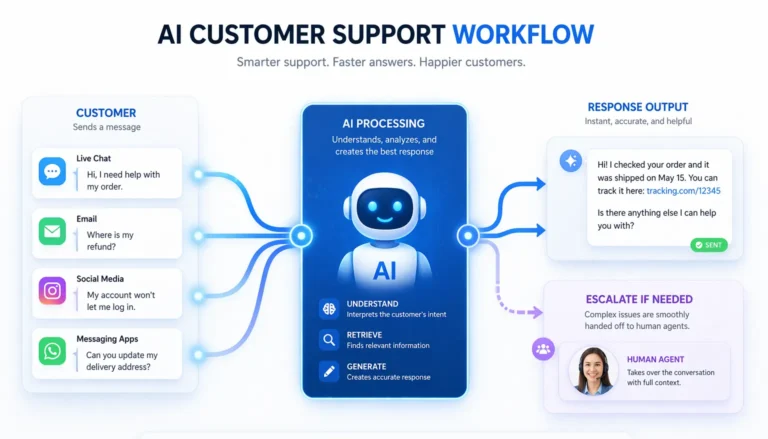
Top 20 AI-Tools to Boost Productivity and Automate Your Workflows
AI-tools have become essential for productivity, automation, content creation, and technical workflows. This guide walks through twenty leading platforms that offer practical, real-world value. No hype—just tools that actually make work easier.
Whether you’re automating a recurring workflow, polishing writing, or optimizing your website content, these AI tools cover the full spectrum. The list includes automation engines, reasoning models, SEO assistants, content creators, and design platforms.
1. ChatGPT
ChatGPT is one of the most flexible AI assistants available. It helps with ideation, drafting, analysis, summarization, troubleshooting, and more. Many teams now treat it as a general-purpose reasoning partner.
2. Claude
Claude by Anthropic is known for strong analytical reasoning and long-context handling, making it valuable for research-heavy tasks and structured writing.
3. Notion AI
Notion AI enhances the Notion workspace with drafting, summarizing, organizing, and quick rewrite capabilities. It’s ideal for planning and productivity workflows.
4. Jasper
Jasper AI writing assistant focuses on content creation, helping marketers and teams produce consistent copy, outlines, and long-form drafts.
5. Writesonic
Writesonic supports fast content creation, social posts, and marketing copy. It’s designed for speed, making it useful when you need volume.
6. Grammarly
Grammarly writing assistant improves tone, clarity, correctness, and style across emails, documents, and browser-based writing.
7. Zapier
Zapier automation platform connects thousands of apps to automate repetitive tasks without coding. It’s one of the most widely adopted workflow tools.
8. Make
Make automation platform offers a visual-first automation builder with more granular control for advanced users.
9. Scribe
Scribe step-by-step recorder captures workflows as documentation automatically. It’s helpful for training materials and SOPs.
10. Semrush
Semrush is a comprehensive SEO suite offering keyword research, competitive analysis, and performance auditing.
11. Surfer SEO
Surfer SEO analyzes top-ranking pages and provides guidelines to improve content structure, keyword usage, and competitiveness.
12. Canva
Canva design platform integrates AI tools for visual editing, layouts, and design generation. Useful for social graphics and branding.
13. Adobe Creative Cloud
Adobe Creative Cloud includes Firefly-powered AI tools for design, photography, and video workflows.
14. Hostinger
Hostinger provides hosting with AI-assisted website building and optimization features.
15. Google Analytics
Google Analytics offers measurement and insights enhanced by predictive models and automated reporting.
16. Google Search Console
Google Search Console provides performance data and indexing insights. While not an AI tool itself, it integrates with AI-driven SEO workflows.
17. Trello
Trello now includes automation rules (Butler) that can streamline recurring project-management actions.
18. Slack
Slack integrates AI summarization, message search improvements, and workflow automation connectors.
19. Ahrefs
Ahrefs offers AI-assisted keyword clustering, competitor research, and content-gap recommendations.
20. Google Docs with AI assistive features
Google Docs includes AI-supported suggestions for drafting, rewriting, and formatting.
Who This Is For
This guide is built for professionals, freelancers, team leads, and anyone looking to strengthen their workflows with dependable AI tools. If your workday includes repetitive tasks, creative production, planning, or optimization, these platforms can offer genuine time savings.
Core Idea in Simple Terms
AI tools help reduce manual work, improve accuracy, and streamline decision-making. They make complex tasks manageable and routine tasks automatic, giving you more time to focus on work that matters.
Example Use Cases
- Drafting reports or content using AI writing assistants.
- Automating file transfers, notifications, or data entry between apps.
- Optimizing articles for search visibility.
- Designing graphics without specialized creative skills.
- Documenting internal workflows automatically.
Common Mistakes to Avoid
- Relying exclusively on AI output without human review.
- Deploying too many tools at once, leading to complexity.
- Ignoring data privacy when connecting third-party apps.
- Skipping proper workflow testing before automation goes live.
Simple Checklist
- Define the problem you want to solve.
- Choose one or two tools that match your needs.
- Start small with a single workflow or task.
- Review and refine output regularly.
- Expand usage only when the workflow is stable.
Tools Mentioned in This Guide
- ChatGPT – AI assistant for reasoning and drafting. Try Here: ChatGPT
- Claude – Advanced reasoning model. Try Here: Claude by Anthropic
- Notion AI – Workspace AI assistant. Try Here: Notion AI
- Jasper – AI writing assistant. Try Here: Jasper AI writing assistant
- Writesonic – Fast content generation tool. Try Here: Writesonic
- Grammarly – Writing enhancement tool. Try Here: Grammarly writing assistant
- Zapier – Automation platform. Try Here: Zapier automation platform
- Make – Visual automation builder. Try Here: Make automation platform
- Scribe – Workflow documentation tool. Try Here: Scribe step-by-step recorder
- Semrush – SEO research suite. Try Here: Semrush
- Surfer SEO – Content optimization tool. Try Here: Surfer SEO
- Canva – Visual design tool. Try Here: Canva design platform
- Adobe Creative Cloud – Creative suite. Try Here: Adobe Creative Cloud
- Hostinger – Hosting and site tools. Try Here: Hostinger
- Google Analytics – Site analytics. Try Here: Google Analytics
- Google Search Console – Search performance tool. Try Here: Google Search Console
- Trello – Project management tool. Try Here: Trello
- Slack – Team communication platform. Try Here: Slack
- Ahrefs – SEO and research tool. Try Here: Ahrefs
- Google Docs – Collaborative editor with AI suggestions. Try Here: Google Docs
Next Steps
Start with two or three tools that match your current goals. Once you see consistent results, gradually expand your toolkit. AI becomes most valuable when integrated into daily workflows, not used as a one-off solution.
With the right mix of tools, you can reduce busywork, elevate quality, and create a more sustainable work rhythm.
Conclusion
AI tools are no longer experimental—they’re dependable partners that support planning, writing, design, automation, and decision-making. Try a few, refine how you use them, and let them take some of the routine work off your plate. It’s efficiency without the overtime.