
How to Automate Customer Support with AI (Step-by-Step Guide for 2026)

Customer support takes time, and most of it is repetitive. This guide explains how to automate customer support with AI step by step, what it actually means in practice, which tools you can use, and where automation works best (and where it doesn’t).
What is AI customer support automation?
AI customer support automation means using artificial intelligence to handle repetitive support tasks automatically, instead of answering everything manually.
This includes:
- Answering common questions instantly
- Drafting replies to emails and chats
- Routing messages to the right place
- Using your existing content (FAQs, docs, emails) to generate answers
You can think of it as a layer between your customer and your inbox that filters and handles most of the workload.
Many businesses discover that 60–70% of support requests are repetitive. That is what AI is best at handling.
How does AI customer support automation work?
At a basic level, AI reads incoming messages, compares them with known information, and generates a response or action.
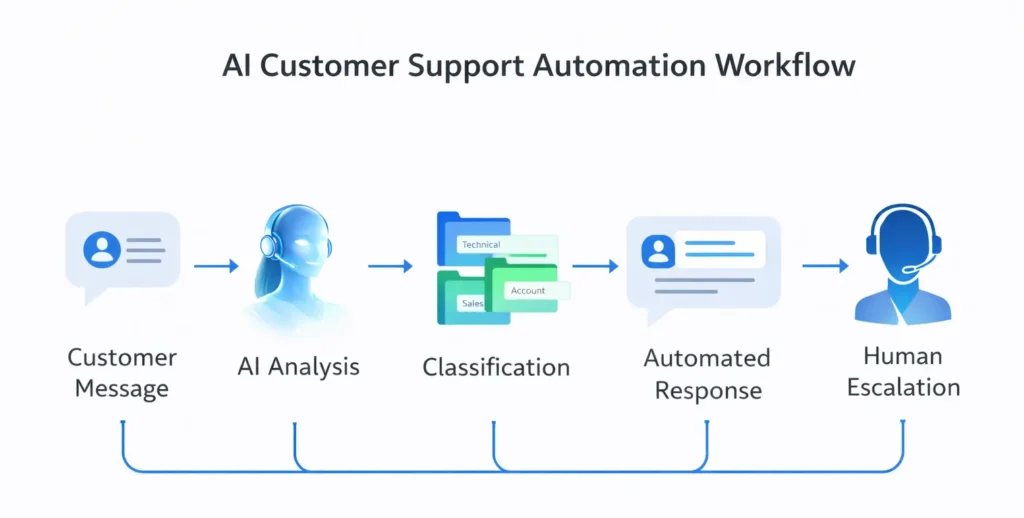
Step-by-step explanation
- 1. A customer sends a message. This can be via email, chat, or a support form.
- 2. The AI interprets the request. It identifies intent, keywords, and context.
- 3. It searches your knowledge base. This can include FAQs, previous replies, and product information.
- 4. It generates a response. The AI writes a reply based on the available information.
- 5. It decides what to do next. Either send the reply automatically or forward it to a human.
- 6. The system improves over time. You refine answers and expand the knowledge base.
Concrete example
A customer asks: “Where is my order?”
Instead of waiting for you to respond, the system can:
- Recognize the question
- Pull shipping information
- Send a clear reply instantly
If the question is more complex, the AI can draft a reply for you instead of answering fully on its own.
Step-by-step guide to automate customer support
Step 1: Map your support requests
Start by reviewing your last 20–50 support messages.
Group them into:
- Frequently asked questions
- Simple requests (status, refunds, access)
- Complex issues that require human input
This gives you a clear picture of what can be automated.
Step 2: Create a simple knowledge base
AI needs something to learn from.
Start with:
- FAQ page
- Common email replies
- Basic product or service explanations
Keep it simple. You are not building a full documentation system — just enough for AI to give correct answers.
Step 3: Choose the right tools
You don’t need a complex setup.
Common options include:
- ChatGPT-based workflows for simple setups
- CustomGPT or similar tools trained on your content
- Helpdesk tools like Zendesk or Intercom with AI features
- Platforms like Boost.ai for more advanced automation
The goal is not to use many tools, but to reduce manual work.
Step 4: Automate first responses
This is where most of the value comes from.
Instead of manually replying to every message, AI can:
- Answer basic questions instantly
- Provide instructions (refunds, setup, access)
- Handle common requests without delay
Even partial automation saves a significant amount of time.
Step 5: Use AI as a draft assistant
For more complex cases, AI can generate reply drafts.
You review, adjust if needed, and send.
This can reduce response time by 50–70% without losing quality.
Step 6: Add escalation rules
Not everything should be automated.
Define when a human should step in:
- Complaints or frustrated customers
- Refund disputes
- Technical issues
Everything else can be handled automatically or semi-automatically.
Step 7: Improve the system over time
Automation gets better as you:
- Update your knowledge base
- Fix incorrect responses
- Add new common questions
Over time, the system becomes more accurate and useful.
Key benefits
- Faster responses: Customers get answers instantly.
- Less repetitive work: AI handles common questions.
- Scalability: You can support more customers without hiring.
- Consistency: Answers become more uniform and predictable.
- Better focus: You spend time on complex issues instead of simple ones.
Limitations
AI customer support is useful, but not perfect.
- It can be wrong: AI may misunderstand or give incomplete answers.
- Needs good input: Poor knowledge base = poor results.
- Not ideal for complex issues: Humans are still needed.
- Requires monitoring: You need to review and improve responses.
FAQ
Can AI fully replace customer support?
No. AI works best as a first layer that handles repetitive tasks. Human support is still needed for complex or sensitive issues.
Do I need technical skills to set this up?
Not necessarily. Many tools are designed for non-technical users, especially for basic automation.
What is the easiest way to start?
Start by creating a simple FAQ and using an AI tool to generate responses based on that content.
Is this expensive?
Basic setups can be low-cost. More advanced systems with integrations can be more expensive, depending on scale.
What type of business benefits most?
Any business with repeated customer questions, especially e-commerce, SaaS, and service-based businesses.
Conclusion
AI customer support automation is not about replacing humans, but reducing repetitive work.
The biggest gains come from:
- Automating common questions
- Using AI to draft responses
- Improving the system over time
Summary: AI can handle a large portion of customer support by answering repetitive questions, assisting with replies, and routing requests, allowing you to save time and scale support more efficiently.